 |
 |
|
|
This option allows you to search the manifest details using SaudiEDI application.
To search the import manifest details
1. Open the Manifest Search page. (SAUDIEDI>> Manifest>> Search)
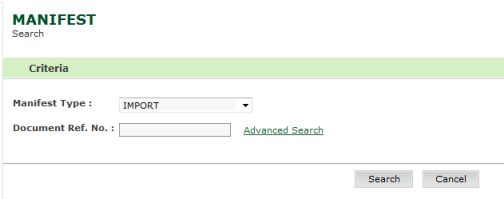
Manifest Search Page
2. Enter
information in the Search Criteria
fields.
| Field | Description |
Manifest Type |
Select the manifest type from the drop down list. |
Document Ref No. |
Enter the document reference number. |
Note: I f you do not know the Document Ref. No., click Advanced Search hyper link. |
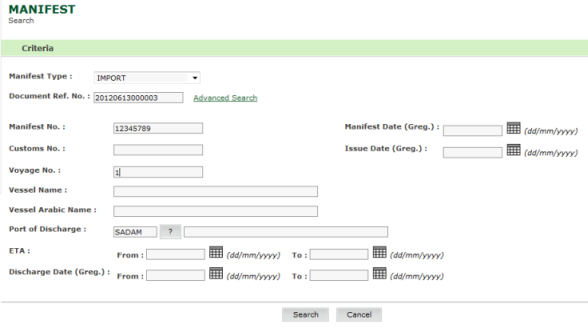
Advanced Search page
3. Enter the information in the Advanced Search Criteria fields.
| Field | Description |
Document Ref. No |
Enter the document reference number. |
Manifest No. |
Enter the manifest number. |
Manifest Date |
Enter the manifest date using the calendar icon. |
Customs No. |
Enter the customs number relevant to the manifest. |
Issue Date |
Enter the date using the calendar icon. |
Voyage No. |
Enter the voyage number. |
Vessel Name |
Enter the vessel name in English. |
Vessel Arabic Name |
Enter the vessel name in Arabic. |
Port of Discharge |
Enter
the port or select the port of discharge using the selection |
ETA |
Enter the from/to estimated date of arrival. |
Discharge Date |
Enter
the vessel discharge date using the calendar |
4. Click Search. The Manifest Search Result page is displayed.
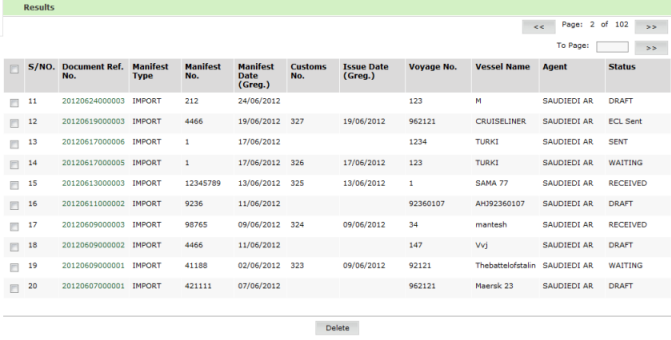
Manifest Search Result page
5. Click Document Reference Number. The Import Manifest View page is displayed.
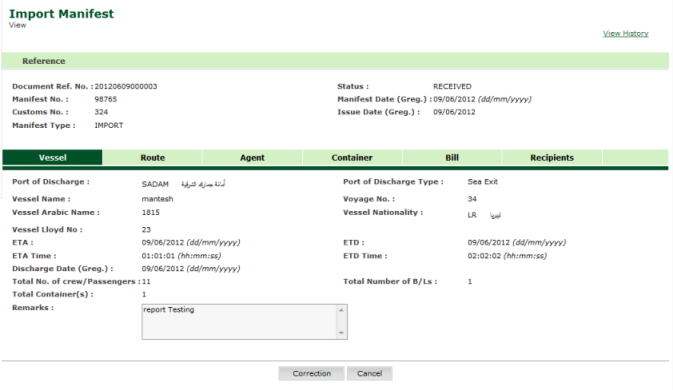
Import Manifest View Page
Related Topics:
|

 icon.
icon.