 |
 |
|
|
This option is used to create an invoice for the export declaration using SANAM application.
To add invoice details
1. Open the Invoice page. (SAUDIEDI>> Export Declaration>> Create>> Invoice)

Adding Invoice page
2. Click Add link, invoice details screen is displayed.
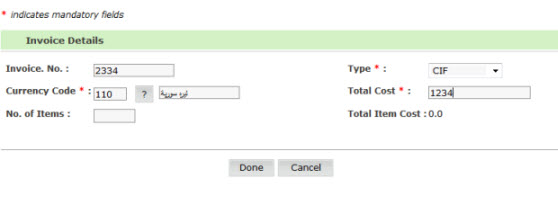
Invoice Details page
3. Enter information in the invoice details fields.
| Field | Description | |
Invoice No |
Enter the Invoice Number.
|
|
Invoice Type
|
Select the Invoice type from the drop down list. 1 = X-Factory 2 = FOB 3 = C&I 4 = C&F 5 = CIF 9 = Exception
|
|
| Currency Code | Select the Invoice Currency Code. If you
do not know the Currency code click |
|
Total Cost Invoice |
Enter the total cost for the invoice. Total Coast should match with the Total Items cost under that invoice. |
|
No. of Items |
Enter total number of Items under this invoice. |
4. Click Done, invoice added screen is displayed.
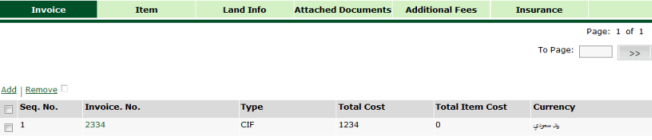
Invoice Added page
Related Topics: Back To: Creating Export Declaration Details
|
 button.