 |
 |
|
|
This option allows you to modify the existing route details in the import manifest using SaudiEDI application.
To modify the ECL route details
1. Open the Search ECL Route Details page. (SAUDIEDI>> Manifest>> Search)
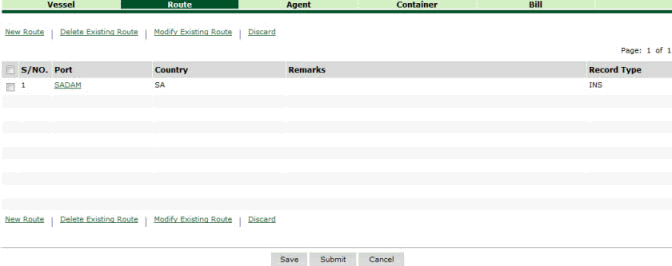
Search ECL Route Details page
2. Click the Modify Existing Route hyper link. The Existing Route Details is displayed.
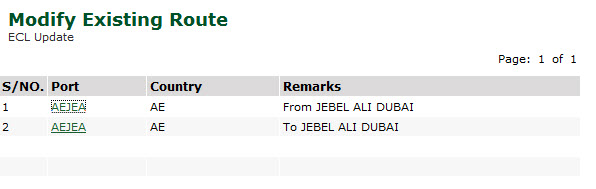
Existing Route Details
3. Click Port hyper link. The Route Details page is displayed.
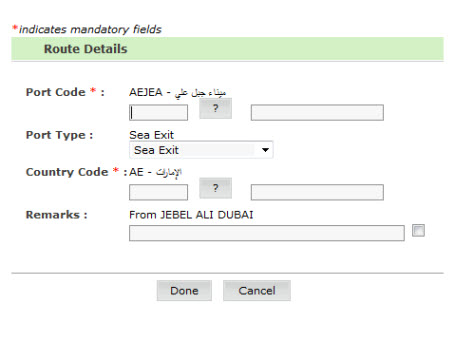
Route Details page
4. Modify the necessary information in the Route Details fields.
5. Click Done. The updated Route Details page is displayed.
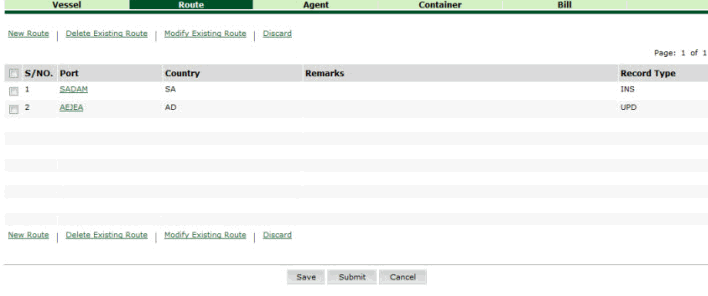
Updated Route Details page
Related Topics: Back to:
|