 |
 |
|
|
This page allows you to enter information related to item details of a bill.
To create Item Details:
1. Open the Item Tab.
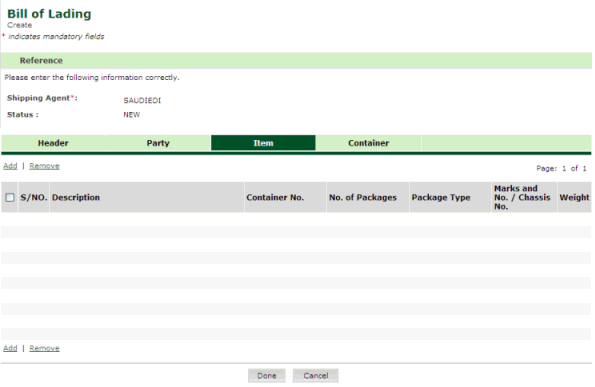
Bill of Lading Items page
2. Click Add hyper link. The Bill of Lading Items Details page is displayed.
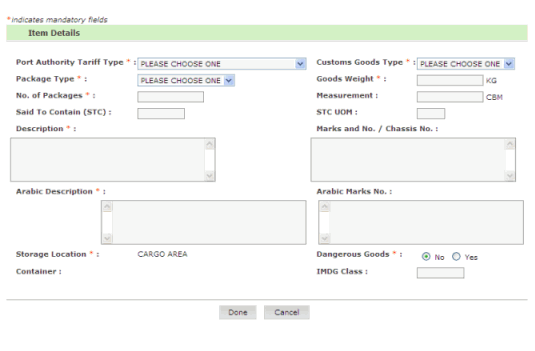
Bill of Lading Items Details page
3. Enter information in Items Details fields.
| Field | Description |
Port Authority Tariff Type |
Select the port authority tariff type from the drop down list (e.g., GENERAL CARGO, CEMENT, etc). |
| Custom Goods Type | Select the customs goods type from the drop down list (e.g., CAR, TRAILER,etc). |
Package Type |
Select the package type from the drop down list (e.g., UNIT, BOX, PALLET, etc). |
Goods Weight |
Enter the declared gross goods weight in kilograms. |
No. of Packages |
Enter the number of packages of items. |
Measurement |
Enter the measurement of goods in cubic meters. |
Said To Contain(STC)
|
Enter the number said to contain in the package. |
STC UOM |
Enter the unit of measurement of STC. |
Description
|
Enter the goods description in English. |
Marks and No. or Chassis No. |
Enter the cargo marks and number in English.
|
Arabic Description
|
Enter the party name in Arabic. |
Arabic Marks No. |
Enter the party address.
|
Dangerous Goods
|
Select the relevant radio button if it belongs to dangerous goods.
|
Container |
Enter the postal code number |
IMDG
|
Enter the Telephone number |
4. Click Done button. The updated Bill of Lading Items page is displayed.
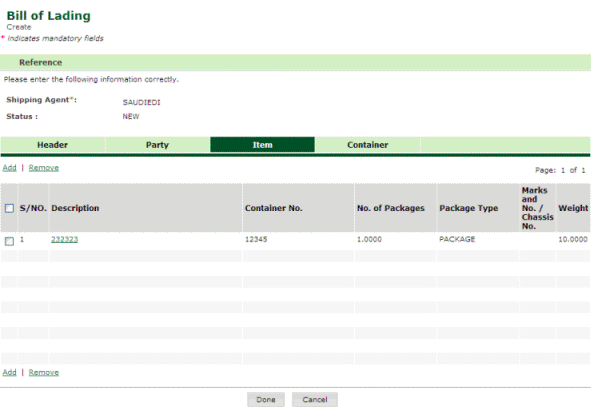
Bill of Lading Items Added page
Related Topics: Back to: |