 |
 |
|
|
This page allows you to search and add the ECL container details of the import manifest in the SaudiEDI application.
To add ECL container details
1. Open the Search ECL Container Details page. (SAUDIEDI>> Manifest>> Search)
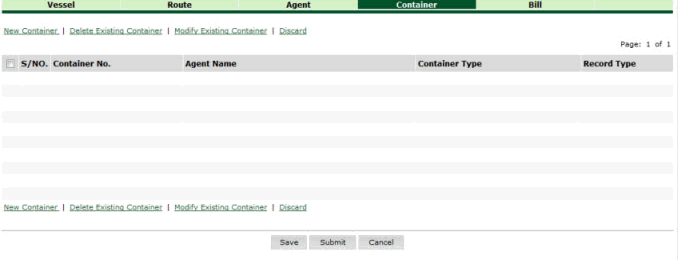
Search ECL Container Details page
2. Click New Container hyper link. The Container Details page is displayed.
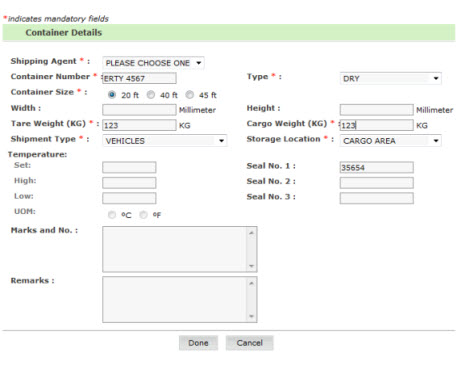
Container Details page
3. Enter information in the Container Details fields.
| Field | Description |
Shipping Agent |
Select the shipping agent from the drop down list. |
| Container Number | Enter the container number. |
| Seal No. 1 | Enter the type seal number 1. |
Type |
Select the type from the drop down list (e.g., DRY, TANK, etc). |
Seal No. 2 |
Enter the type seal number 2. |
| Container Size | Select any one of the options by selecting the radio button to enter the container size. |
Seal No. 3 |
Enter type seal number. |
Width |
Enter the width of the container in millimeter. |
| Height | Enter the width of the container in millimeter. |
Tare Weight |
Enter the tare weight in kilograms. |
Goods Weight |
Enter the goods weight of the container in kilograms. |
| Shipment Type | Select the shipment type from the drop down list (e.g., FCL, LCL, PCL, etc). |
Set |
Enter the temperature of the container. |
High |
Enter the highest temperature of the container. |
Low |
Enter the lowest temperature of the container. |
UOM |
Select the degree of temperature of the container. |
| Marks and No | Enter the cargo marks and number. |
| Remarks | Enter the remarks. |
4. Click the Done button. The ECL Container Details Added page is displayed.
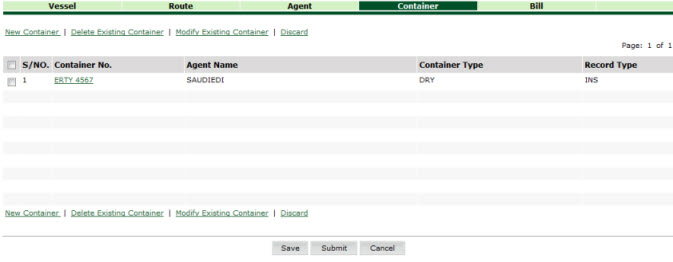
ECL Container Details Added page
Related Topics: Back to:
|