 |
 |
|
|
This allows you to enter information in the vessels section of the manifest in the SaudiEDI application.
To create vessel details
1. Open the Vessel Tab page. (SAUDIEDI>> Manifest>> Create>> Vessel)
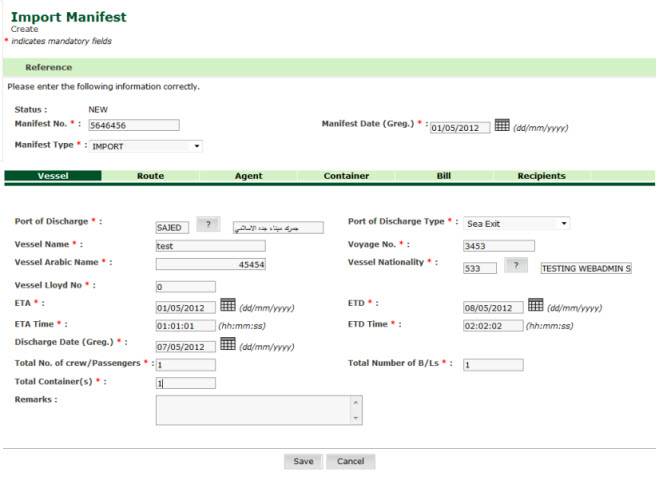
Vessel Details page
2. Enter information in the Vessel Details fields.
| Field | Description |
| Port of Discharge | Enter
the port or select the port of discharge using the selection
 icon.
icon. |
| Port of Discharge Type | Select the port of discharge type from the drop down list (e.g., Sea Exit, Land Exit, etc). |
| Vessel Name | Enter the vessel name in English. |
| Voyage No. | Enter the voyage number. |
| Vessel Arabic Name | Enter the vessel name in Arabic. |
| Vessel Nationality | Enter
the vessel nationality using the selection  icon. icon. |
| Vessel Llyod No | Enter the vessel identification number. |
| ETA | Enter the estimated date of arrival. |
| ETD | Enter the estimated date of departure. |
| ETA Time | Enter the estimated time of arrival. |
| ETD Time | Enter the estimated time of departure. |
| Discharge Date | Enter
the vessel discharge date using the calendar  icon.
icon. |
| No. of Crew/ passengers | Enter the number of crew or passengers. |
| Total no of B/Ls | Enter the total number of bills of lading in the manifest. |
| Total Containers | Enter the total number of containers in the manifest. |
| Remarks | Enter the remarks of the vessel. |
Validations Rules for Header
1. Manifest type must in the list specified in the message specification.
2. ETA mype="header" ?>
This page allows you to enter information in the vessels section of the manifest in the SaudiEDI application.
To create vessel details
3. Open the Vessel Tab page. (SAUDIEDI>> Manifest>> Create>> Vessel)
Vessel Details page
4. Enter information in the Vessel Details fields.
| Field | Description |
| Port of Discharge | Enter
the port or select the port of discharge using the selection
icon. |
| Port of Discharge Type | Select the port of discharge type from the drop down list (e.g., Sea Exit, Land Exit, etc). |
| 17. Actual Container Size must be equals to
Assigned Container Size if there is container. 18.
Duplicate manifest records -- On a ETA day, no more than one manifest
with the
|